This is the whole report on one page, intended for reading end to end or printing to PDF. The chaptered edition is the primary version.
Executive Summary
Cloud-security conclusions should be tied to the environment that is
actually deployed, not inferred solely from diagrams or infrastructure
templates.
This review method starts by reconstructing what is actually deployed
in Azure and how data moves through it from start to finish. It then uses
safe, read-only records to examine identities, network boundaries,
settings, stored credentials, data services, containers, releases,
logging and alerts.
The resulting architecture view shows which service path each security
control protects.
Assessment Principle
Treat every cloud claim as a statement that needs a reproducible source, a clear explanation of what the evidence can and cannot prove, and an explicit confidence level.
Scope and What the Evidence Can Prove
Application and identity: The review follows the
deployed application from the browser and API through background
processing in
Azure Container Apps.
It checks how
Microsoft Entra ID,
application identities and network connections join those components.
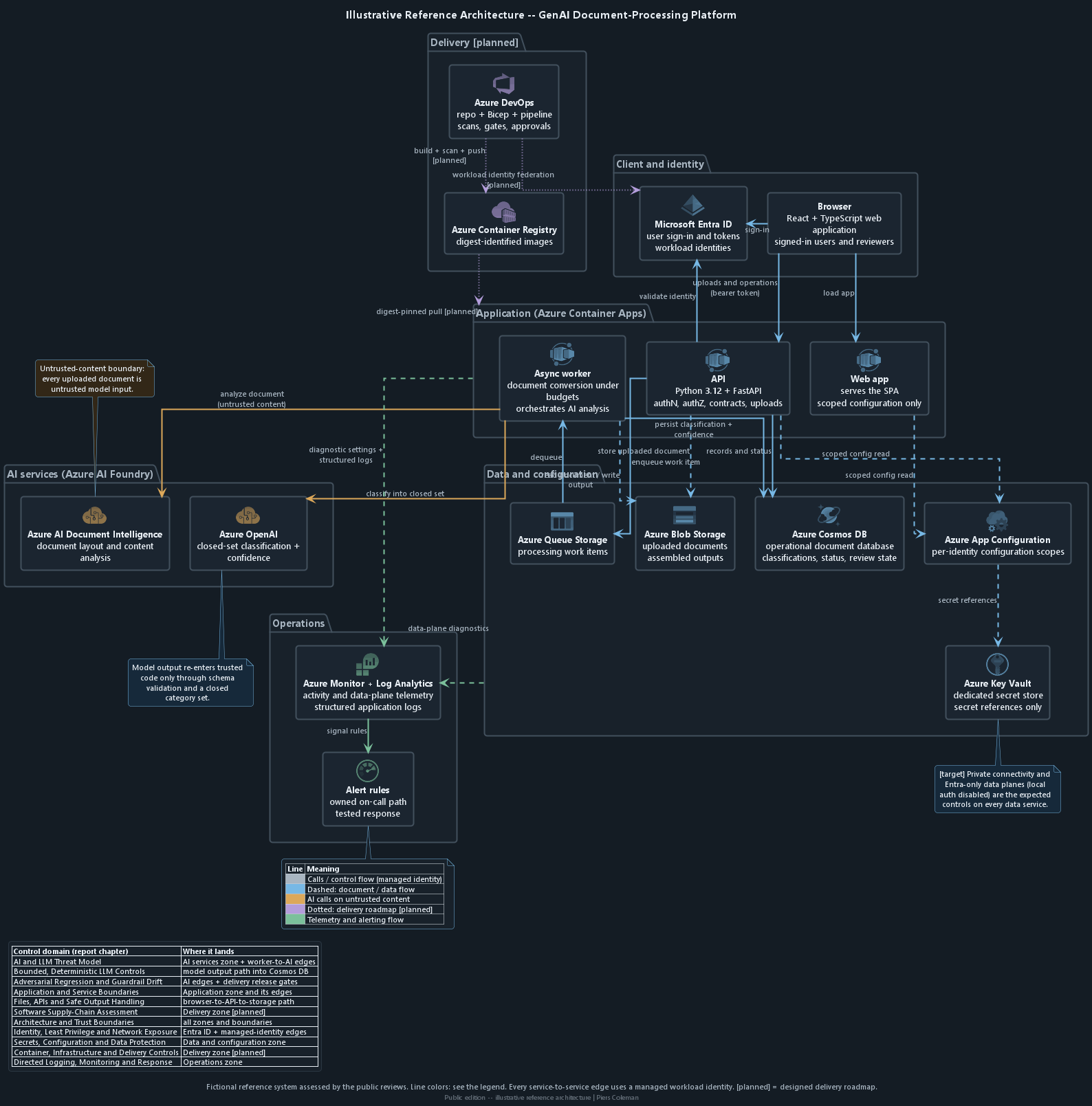
Click or tap a zone or checkpoint on the diagram to jump to the related illustrative security examples.
The illustrative reference platform assessed across both reports. The architecture is fictional and representative: it names Azure services to anchor the review method and contains no client environment details. See also the document-processing flow and the trust-boundary view.
Which security events are recorded, how long logs are kept and who receives each alert
Access to stored data is not recorded
Logs disappear before an investigation
Alerts reach no named owner
How Data and Access Move Through the System
A useful cloud-security diagram must show more than service icons. It
should show which identity connects, where data moves, what each
component can do and where untrusted input enters a more trusted part
of the system.
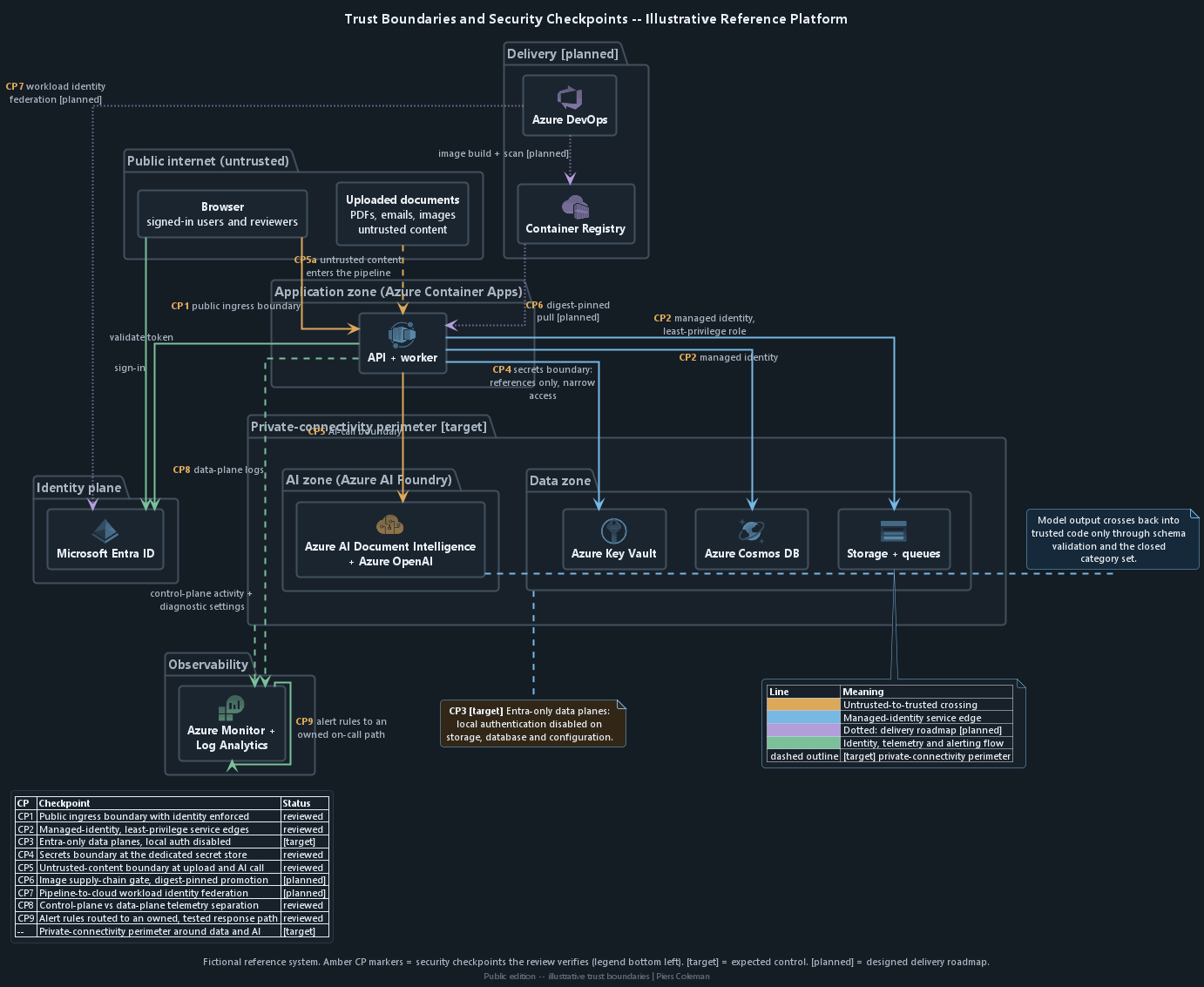
Security checkpoints
Reviewed means the checkpoint is included in this demonstration review.
Target marks the expected architecture; planned marks the release roadmap.
Checkpoint
Security check
Review posture
CP1
The public entry point requires sign-in.
Reviewed
CP2
Application identities have only the access they need.
Reviewed
CP3
Microsoft Entra ID controls data access and local access keys are disabled.
Target
CP4
Passwords and keys stay in Azure Key Vault with limited access.
Reviewed
CP5
Uploaded documents remain untrusted at intake and at the AI call.
Reviewed
CP6
The release admits only an approved container image digest.
Planned
CP7
The release pipeline uses a short-lived Microsoft Entra ID identity.
Planned
CP8
Administration and data-access logs remain separate.
Reviewed
CP9
Alert rules route to an assigned, tested response path.
Reviewed
Boundary
A private network boundary surrounds the data and AI services.
Target
Click or tap a zone or checkpoint on the diagram to jump to the related illustrative security examples.
Security checkpoints the review verifies, overlaid on the illustrative platform. [target] marks expected controls; [planned] marks the designed release roadmap. See also the full reference architecture on the report overview.
Architecture question
Security purpose
Access and data boundaries
Which identity performs each service-to-service call?
Checks that each identity has only the access it needs and that enforced policy, not an application assumption, decides permission.
Where does client information cross a service boundary?
Identifies requirements for encryption, permission checks, audit records and limits on collected or retained data.
Application and deployment controls
Which component can transform or act on model output?
Locates the fixed code check around AI output that can vary.
Which controls exist only in deployment configuration?
Highlights differences that can develop between cloud setup files and the live environment.
Fictional Security Examples
Illustrative Architecture and Trust-Boundary Examples
Illustrative only - not an engagement finding
A Public API Can Accept Sensitive Requests Without Checking Access
A public Azure API must establish a trusted identity boundary before sensitive requests reach application code. It must validate the caller's Microsoft Entra ID token, admit only approved application roles and keep service identities separate.
Assessment profile
Ease of attack
A reachable API accepts the requestA caller reaches a Container Apps API without valid Microsoft Entra ID sign-in or an approved application role.
Impact
Protected services or privileged work are exposed
A caller could reach APIs and services intended only for trusted users or workloads.
A caller could trigger work intended for an approved user or service.
Detection difficulty
Exercise each entry pathTest signed-out, wrong-tenant, wrong-issuer, wrong-audience and wrong-role requests through the public API.
Pattern
Cloud admission before application authorizationAzure ingress and identity controls decide who may reach sensitive operations; application code separately decides which customer records and actions that caller may use.
Expected fixVerification
1
Expected fixRequire identity at public entryContainer Apps ingress and Microsoft Entra ID: Require authentication before the API accepts a sensitive request.
Expected fixValidate every token boundaryMicrosoft Entra ID token validation: Accept only the approved tenant, issuer and API audience.
VerificationReject tokens for another boundaryWrong-tenant, wrong-issuer and wrong-audience tokens are rejected before the API operation.
3
Expected fixRestrict sensitive operations to approved rolesMicrosoft Entra ID application roles and FastAPI route policy: Map each sensitive operation to the roles allowed to reach it.
VerificationDeny the wrong application roleA validly signed-in caller without the required application role receives 403, while the approved role still works.
4
Expected fixKeep transport and ingress restrictions explicitContainer Apps ingress and network configuration: Require HTTPS and expose only the intended public entry point.
VerificationBlock unintended entry pathsPlain HTTP, internal-only routes and unapproved ingress paths cannot reach the sensitive API.
5
Expected fixSeparate service identitiesContainer Apps workloads, Microsoft Entra ID, Blob Storage and Cosmos DB: Give each workload only the managed-identity roles it requires.
VerificationEnforce the role boundaryA service call without the required role fails, while approved service operations still complete.
A background worker can become a path to internal services or outside systems if it accepts a destination from an upstream response and attaches its own identity when it connects.
Assessment profile
Ease of attack
A returned address controls the next requestAn attacker influences a destination, redirect, port or DNS result that the worker follows.
Impact
The worker's authority reaches the wrong place
A destination could receive a privileged request or token.
The worker could reach an internal, cloud-metadata or otherwise unintended service.
Detection difficulty
Follow the destination through the workerTrace the original value, redirects, DNS resolution, token audience and egress decision before connection.
Pattern
The worker chooses approved destinationsA response may supply data, but server-owned rules decide where the worker may connect and when its identity is used.
Expected fixVerification
1
Expected fixAllow only approved destinationsBackground-worker destination validation: Keep scheme, host and port in a server-controlled allowlist.
VerificationReject an unapproved addressAn unknown host, scheme or port fails before any connection.
2
Expected fixBlock internal and metadata addressesWorker DNS and address validation: Resolve destinations before connecting and reject private, loopback, link-local and cloud-metadata addresses.
VerificationStop internal-address attemptsEach blocked address fails before a credential is attached.
3
Expected fixRecheck redirects and DNS changesWorker HTTP client: Disable redirects or validate every redirected destination and resolved address again.
VerificationReject a changed routeA redirect or changed DNS result cannot move the request to an unapproved address.
4
Expected fixBind identity tokens to expected audiencesContainer Apps managed identity and Microsoft Entra ID: Request a token only for a fixed, expected audience.
VerificationDeny an unexpected audienceA token request for any other audience fails.
5
Expected fixConstrain outbound workBackground-worker Container Apps environment: Restrict egress and enforce connection-time, response-size and retry limits.
VerificationBlock excess or unapproved egressNetwork controls stop a missed destination, while an approved destination completes within its limits.
Documentation helps approved teams use an API. The same public documentation can give an attacker a map of administrative, diagnostic and internal operations that no anonymous caller should discover.
Assessment profile
Ease of attack
Public discovery routes can reveal the mapDocumentation, schemas or discovery routes are reachable on the public Container Apps address.
Impact
Sensitive operations become easier to find
An attacker learns available operations and parameters.
Internal routes, hostnames or provider behaviour can reveal how to target the service.
Detection difficulty
Check the public surface directlyTest documentation, schema, discovery and error routes as signed-out and differently authorized callers.
Pattern
Production exposes only the intended APIDisabled development routes stay unreachable; required documentation follows the same sign-in and role rules as the API.
Expected fixVerification
1
Expected fixDisable unnecessary discovery routesContainer Apps API production configuration: Remove public documentation, schema and discovery routes that are not needed.
VerificationReturn no routeA signed-out request to a disabled route returns 404.
2
Expected fixProtect required documentationContainer Apps API and Microsoft Entra ID: Require the same sign-in and role checks as the underlying API.
VerificationReject an unauthorized readerSigned-out or wrong-role access returns 401 or 403.
3
Expected fixShow each role only its permitted operationsAPI documentation and schema generation: Expose only operations and schemas that the signed-in role may use.
VerificationLimit the visible contractAn approved role sees only its permitted operations and schemas.
4
Expected fixRemove implementation detail from responsesAPI error handling: Omit internal hostnames, stack traces, provider errors and implementation-only routes.
VerificationReturn a safe public errorPublic failures contain no internal hostname, stack trace or raw provider detail.
5
Expected fixGate the production surfaceAzure DevOps [planned] release gate: Fail the production gate when a disabled development route becomes reachable.
VerificationCatch a re-enabled routeThe release gate fails when a disabled route responds.
Zero Trust means checking every request instead of trusting it because
of where it came from. The ability to connect, a person's sign-in and
the identity used by an application answer different security questions
and must be checked separately.
Use managed identities for applications instead of storing keys or connection strings.
Give each role access only to the service, operation and environment it needs.
Check permission again in every service that receives a request instead of trusting the caller or AI model.
Treat incoming public access, service administration and access to stored data as separate controls.
Record deliberate exceptions with an owner, expiry condition and verification step.
Fictional Security Examples
Illustrative Identity and Access Examples
Illustrative only - not an engagement finding
One Application Identity Can Access Too Many Parts of the System
A broadly privileged application identity allows one compromised service to become a stepping stone into settings, processing and data systems that should remain separate.
Assessment profile
Ease of attack
Requires compromise of one workloadOne application identity holds broad permissions across ingress, configuration, processing and data services.
Impact
Cross-zone access and privilege escalation
A compromise in one application could spread into parts of the system with different levels of trust.
It could expose administration, credentials, personally identifiable information (PII) and other protected customer data.
Detection difficulty
Visible in role-assignment review across services
List every Entra ID role assignment.
List permissions to stored data in Storage, Cosmos DB and App Configuration.
List reachable services and the effective access available to each application identity.
Pattern
Example least-privilege pattern
Expected fixVerification
1
Expected fixGive each application service its own managed identitydo not share identities or reusable credentials.
VerificationEach application service must complete its approved function through its own managed identity
2
Expected fixScope each Azure role to the smallest resource and set of operations the service needs
VerificationEach identity must be denied resources, configuration values and data assigned to another service
3
Expected fixPrevent one service identity from reading another service's App Configuration values, secrets or customer data
VerificationThe deployed configuration must contain no reusable credential that substitutes for the managed identity
4
Expected fixRestrict network paths between services with different trust levels
VerificationNetwork tests must block service paths outside the approved trust boundary
5
Expected fixReview role assignments regularly and alert on unexpected privilege changes
VerificationAn unexpected role assignment must be detected by the access review or alerting control
The public web app should expose the least information and authority. Private backend settings in that app can turn a web compromise into access to more privileged services.
Assessment profile
Ease of attack
Requires frontend identity compromiseA public-facing web workload can read configuration values intended only for APIs, workers or data services.
Impact
Backend credentials and service discovery
A compromise of the public web app could reveal private service addresses.
It could reveal reusable credentials or access details for more privileged services.
Detection difficulty
Visible in a review of who can read which configuration
Review App Configuration roles and key prefixes.
Review Key Vault secret references.
Review the effective values available to the web app's identity.
Pattern
Example configuration-separation pattern
Expected fixVerification
1
Expected fixTreat every value delivered to the browser as public information
VerificationThe browser bundle and runtime configuration must contain only the approved public-setting allowlist
2
Expected fixPublish only an explicit allowlist of browser-safe settings
VerificationA planted secret, private backend setting or Key Vault path must fail the build or startup check
3
Expected fixGive the web workload its own limited App Configuration area and identity
VerificationThe web workload's identity must be denied every private backend setting and secret path
4
Expected fixRemove access to private backend settings, Key Vault secret paths and reusable credentials
VerificationThe browser must be unable to retrieve a backend-only setting through an application endpoint
5
Expected fixMake the build or startup fail when an unapproved setting would be exposed to the browser
VerificationThe application must continue to operate using only its explicitly approved public settings
Every unnecessary public connection creates another route that must be defended continuously and makes the system more dependent on sign-in and firewall settings remaining correct.
Assessment profile
Ease of attack
Depends on a valid identity or keyData, configuration or build services still accept public connections even though only known applications need access.
Impact
Expanded reachability and attack surface
Extra connection paths give attackers more routes to test.
They increase reliance on identity and firewall settings remaining perfect.
Detection difficulty
Visible in public-network exposure review
Inspect public-network settings, firewall rules and private endpoints across Storage, Cosmos DB, App Configuration and Container Registry.
Inspect name resolution and documented exceptions.
Pattern
Example private-connectivity pattern
Expected fixVerification
1
Expected fixUse private endpoints for Storage, Cosmos DB and App Configuration, and explicitly disable their public network access
VerificationConnections from an external test location must fail for Storage, Cosmos DB, App Configuration and internal Container Apps
2
Expected fixKeep backend Container Apps on internal ingressexpose only the web entry point that users require.
VerificationApproved private workloads must continue to connect through private endpoints and private DNS
3
Expected fixConfigure private DNS and network rules so approved workloads use the private paths
VerificationOnly the intended web entry point may remain publicly reachable
4
Expected fixDeny unnecessary outbound traffic from application workloads
VerificationAn unapproved outbound destination must fail at the network boundary
5
Expected fixGive every required public exception a named owner, narrow scope, documented purpose and expiry condition
VerificationEvery permitted public exception must show an owner, purpose, narrow scope and expiry date
6
Expected fixUse deployment policy to prevent an expired or unapproved public path from returning
VerificationDeployment policy must reject an expired or unapproved public path
Review application settings, stored credentials and data services as one
access path. Removing a password from application code does not help if
another widely accessible service exposes the same access or data.
Control pattern. Use managed identities, restricted
network paths and one protected place for stored credentials. Rotate
credentials, encrypt data, keep each customer's access separate,
verify backups and record who accessed personally identifiable
information (PII) or other protected customer information.
Fictional Security Examples
Illustrative Data Protection Examples
Illustrative only - not an engagement finding
Long-Lived Cloud Credentials Exist in Source or Build History
A reusable cloud credential can remain valid after it is deleted from the latest source file because repository history and copied build outputs may still contain a working value.
Assessment profile
Ease of attack
Low effort after obtaining a copyReusable cloud credentials are committed to repository history, copied into build output or retained in a release package.
Impact
Cloud impersonation, cost or data access
Anyone who obtains the credential could use paid services as the application.
They could reach any protected data that the credential permits.
Detection difficulty
Visible in repository and artifact secret scanning
Scan current files, repository history and Azure DevOps build outputs.
Do not attempt to use any discovered credential.
Pattern
Example rotation and identity pattern
Expected fixVerification
1
Expected fixRevoke and rotate exposed material, then review service logs for unauthorized use during its exposed lifetime
VerificationThe previous credential must be rejected, and log review must cover its known exposure window
2
Expected fixPurge the value from current files, repository history, Azure DevOps output, caches and retained artifacts
VerificationCurrent files, repository history, Azure DevOps output, caches and retained artifacts must contain no copy
3
Expected fixReplace the credential with an Entra ID managed identity scoped to the required resource operations
VerificationThe application must operate through managed identity with only its approved resource permissions
4
Expected fixIf a reusable secret is unavoidable, store it in Azure Key Vault, restrict readers and automate rotation
VerificationA planted test secret must block merge and release
5
Expected fixBlock merge and release when scanning of source history or build output finds a credential
VerificationIf a Key Vault secret remains, rotation must complete without an outage and a failed rotation must alert its owner
Treating passwords and access keys as ordinary configuration broadens the number of services and people that can read them and increases the damage caused by any one compromise.
Assessment profile
Ease of attack
Requires access to shared configurationPasswords, access keys or connection strings are stored as ordinary settings that several applications can read.
Impact
Reusable credentials for sensitive services
A compromise of any permitted reader could disclose reusable credentials.
Those credentials could provide access to more sensitive services or data stores.
Detection difficulty
Visible in configuration store review
Classify App Configuration values.
Identify every identity that can read them.
Check whether Key Vault references and managed identities can provide the same access without a stored credential.
Pattern
Example credential-free access pattern
Expected fixVerification
1
Expected fixUse managed identity instead of passwords or access keys wherever the target service supports Microsoft Entra ID
VerificationUnauthorized application identities must be denied every tested secret path
2
Expected fixStore any unavoidable secret in Azure Key Vault rather than App Configuration
VerificationThe public web workload must be unable to read backend credentials or equivalent reusable values
3
Expected fixGive each workload a separate identity and narrowly scoped permission to the specific secret it needs
VerificationApproved services must complete their work through managed identity or narrowly scoped Key Vault access
4
Expected fixAutomate secret rotation and alert on failed or overdue rotation
VerificationA test rotation must complete without an outage, and failed or overdue rotation must alert its owner
5
Expected fixPrevent the public web workload from reading backend credentials or equivalent reusable values
VerificationThe App Configuration inventory must contain no password or access key that belongs in Key Vault
A deletion can appear complete to a user while copies remain in storage or processing queues, creating privacy, retention and incident-response obligations that the application can no longer track reliably.
Assessment profile
Ease of attack
Triggered by partial failure or retryAn application deletes its database record while uploaded files or derived objects remain in storage after a partial failure.
Impact
Unexpected retention of customer data and PII
Customer records, uploaded documents or PII could remain beyond their intended retention period.
It could become disconnected from normal access and deletion controls.
Detection difficulty
Requires testing deletion when a step fails midway
Trace deletion across Cosmos DB records, Blob Storage files and Queue Storage work items.
After retries or interrupted processing, compare every remaining item with the expected state.
Pattern
Example lifecycle-reconciliation pattern
Expected fixVerification
1
Expected fixMake the application own one explicit deletion state across Cosmos DB, Blob Storage and Queue Storage
VerificationNormal access to a test record must stop as soon as deletion begins
2
Expected fixBlock normal access as soon as deletion starts
VerificationInterrupt each Cosmos DB, Blob Storage and Queue Storage cleanup stage, then retry the operation
3
Expected fixMake every cleanup step safe to retry and record which resources have completed
VerificationRepeated cleanup calls must not restore data or create duplicate work
4
Expected fixSend exhausted retries to an owned recovery path instead of silently abandoning partial deletion
VerificationExhausted retries must appear in the owned recovery path
5
Expected fixRetain a minimal completion record containing no PII, document content or credentials, showing that every related item reached its approved deleted or retained state
VerificationEvery related item must reach its approved deleted or retained state with a completion record containing no PII, document content or credentials
Stale destinations make deployments harder to reason about, create noisy failures and can route traffic unexpectedly if an abandoned name is later reused.
Assessment profile
Ease of attack
Requires configuration influenceAn unused setting continues to reference a service destination that has been renamed, retired or never provisioned.
Impact
Routing ambiguity and operational failure
A stale value could send traffic to the wrong place.
It could create confusing errors.
It could make it unclear which setting is correct.
Detection difficulty
Visible when configuration is reconciled against live services
List App Configuration settings.
Trace how the API and worker use each setting.
Separate active settings from values kept only for compatibility.
Pattern
Example startup-validation pattern
Expected fixVerification
1
Expected fixKeep one versioned, authoritative schema and owner for application settings
VerificationA clean deployment must contain only settings defined by the authoritative schema
2
Expected fixRemove stale and duplicate App Configuration values
VerificationUnknown, deprecated and conflicting settings must fail deployment
3
Expected fixReject unknown, deprecated or conflicting settings during deployment
VerificationA deliberately invalid required destination must stop startup before the API or worker serves traffic
4
Expected fixValidate every required setting when the API and worker start
VerificationThe startup error must be clear without exposing a credential or sensitive value
5
Expected fixStop before serving traffic with a clear, non-sensitive error when a required destination or value is invalid
VerificationA valid versioned configuration and its approved rollback version must both start successfully
Delivery security should make the approved path the easiest path. The
planned Azure DevOps design automates repeatable checks and preserves
evidence from pull request through release and rollback.
Code and configuration checks
Dependency and secret scanning
Container-image assessment
Policy and approval gates
Deployment identity without stored credentials
Release evidence that cannot be changed
Build outputs identified by a fixed digest
Controlled rollback
Status distinction. These continuous-integration and
delivery controls describe the designed secure-delivery roadmap. They
are not presented as already operating controls.
Fictional Security Examples
Illustrative Delivery and Release Examples
Illustrative only - not an engagement finding
Unverified Build Inputs Can Produce an Untrusted Release
A release is trustworthy only when the reviewed source and every build input produce the same verifiable output. Changeable external inputs can alter production even when the application repository has not changed.
Assessment profile
Ease of attack
Requires supply-chain influenceA production build uses changeable packages, pipeline actions or base images that are not fixed to an approved digest, which is a content identifier.
Impact
Untrusted code in a release that looks approved
A compromised upstream input could alter the released application.
The change could appear to follow the normal delivery process.
Detection difficulty
Visible in build definition and manifest review
Inspect fixed input versions and package locks.
Inspect Container Registry image digests and records of where each input came from.
Check whether a clean rebuild produces the expected output.
Pattern
Example build-origin and policy pattern
Expected fixVerification
1
Expected fixPin source, packages, actions, base images and build tools by immutable version, hash or digest
VerificationA clean rebuild from the same approved inputs must produce the expected digest
2
Expected fixVerify signatures and origin records before each input enters the build
VerificationA changed hash, invalid signature or unidentified input must fail before the build uses it
3
Expected fixRun isolated builds with only the network access needed to retrieve approved inputs
VerificationThe isolated build must be unable to retrieve an unapproved network input
4
Expected fixBind the source revision, software inventory, build record and output digest in signed release evidence
VerificationSigned release evidence must bind the source revision, software inventory, build record and output digest
5
Expected fixRelease only the Azure Container Registry digest produced from those approved inputs
VerificationOnly that approved digest may be released from Azure Container Registry
A manual production path breaks the evidence chain from reviewed source to running service and allows required security checks or approvals to be skipped when delivery pressure is highest.
Assessment profile
Ease of attack
Requires deployment accessProduction releases are assembled or deployed manually without mandatory code, dependency, secret and container checks.
Impact
Unreviewed code reaches production
Untested, vulnerable or unapproved code could reach production.
The deployment could lack a trustworthy connection to reviewed source.
Detection difficulty
Apparent from release history and audit trails
Compare repository state and Azure DevOps pipeline output.
Compare approvals and deployment records.
Compare the approved digest with the software running in Container Apps.
Pattern
Example governed-delivery pattern
Expected fixVerification
1
Expected fixAllow only a dedicated Azure DevOps pipeline identity to deploy to production
VerificationA direct production deployment by a person or unapproved identity must fail
2
Expected fixPromote the same approved artifact digest between environments instead of rebuilding it
VerificationProduction must accept only the dedicated Azure DevOps pipeline identity and approved digest
3
Expected fixRequire mandatory scans, separation of approval duties and protected environment gates
VerificationThe running Container Apps digest must match source, build, approval and deployment evidence
4
Expected fixRetain source, build, approval, deployment and running-digest evidence that cannot be changed by the deployer
VerificationA deployer must be unable to approve their own protected release when separation is required
5
Expected fixMaintain and regularly test a rollback path to the last approved digest
VerificationRollback to the last approved digest must succeed in a controlled test
Running a container as a restricted system user does not prevent vulnerable code from running, but it limits what that code can change and reduces the reach of a successful compromise.
Assessment profile
Ease of attack
Requires code execution in the containerAn application container relies on the image default instead of declaring a restricted system user that does not have root administrator access.
Impact
Greater filesystem and process privilege
Successful code execution could gain unnecessary filesystem privileges.
It could gain unnecessary process privileges and increase the impact of a container compromise.
Detection difficulty
Visible in container runtime configuration review
Inspect image configuration and Container Apps runtime settings for user identity and capabilities.
Inspect writable paths and filesystem restrictions.
Pattern
Example runtime-hardening pattern
Expected fixVerification
1
Expected fixRun each Container Apps workload as a dedicated non-root user with no privilege escalation
VerificationThe running process must use the approved non-root user with no privilege escalation
2
Expected fixDrop unnecessary Linux capabilities and use a read-only filesystem with narrowly writable temporary paths
VerificationAttempts to write protected paths or use removed Linux capabilities must fail
3
Expected fixGive each workload a separate managed identity with least-privilege Azure roles
VerificationA resource-exhaustion test must stop at the configured CPU, memory or process limit without affecting another workload
4
Expected fixSet CPU, memory and process limits so one compromised container cannot exhaust the environment
VerificationUnapproved ingress and egress connections must fail
5
Expected fixRestrict ingress and egress to the service paths the workload actually needs
VerificationApplication health checks and approved Azure operations must still pass through the least-privilege managed identity
Competing package instructions allow two apparently correct builds to contain different software. That makes vulnerability decisions and emergency rebuilds less dependable.
Assessment profile
Ease of attack
Requires influence over build inputsA project retains competing package-manager files, duplicate package instructions or build tools without fixed versions.
Impact
Build drift and inconsistent remediation
Different environments could resolve different packages.
That difference could make it harder to judge which vulnerabilities matter.
It could make a release harder to reproduce.
Detection difficulty
Visible in a review of the repository's build inputs
Identify the authoritative package manager and lockfile.
Identify the runtime version and clean-build procedure used for release.
Pattern
Example reproducible-build pattern
Expected fixVerification
1
Expected fixKeep one authoritative package manager and lockfile for each application
VerificationRepeated clean builds on approved runners must resolve the same package set and artifact digest
2
Expected fixUse fixed runtime and build-tool versions and verify package integrity during installation
VerificationA missing, bypassed or unexpectedly changed lockfile must fail the pipeline
3
Expected fixMake the pipeline fail when the lockfile is missing, changed unexpectedly or bypassed
VerificationA package with an invalid hash or unapproved source must fail installation
4
Expected fixBuild from a clean environment and retain the resolved package list and artifact digest
VerificationThe retained package inventory must match the built artifact and pass current advisory scanning
5
Expected fixScan that package list against current advisories before release
VerificationAn approved lockfile and toolchain must still produce a successful build
Secure delivery also depends on dependable operation after release.
Logs and alerts become real controls only when each signal has a defined
purpose, owner, response path and test.
Operational layer
Expected outcome
Visibility
Structured application logging
Events contain consistent context without exposing personally identifiable information (PII), credentials or document content.
Azure activity and monitoring of access to stored data
Security-relevant changes and access patterns become observable.
Response and proof
Actionable alerts
Defined signals reach an owner through a tested response path.
Evidence retention
Teams can show what happened, what decision followed and how the outcome was verified.
Fictional Security Examples
Illustrative Monitoring and Response Examples
Illustrative only - not an engagement finding
No Alert Reaches an Owner After PII Access or Privileged Changes
Preventive controls cannot contain every failure. If no useful alert follows a privileged change or access to PII or other protected data, a serious compromise can continue without reaching an owner in time.
Assessment profile
Ease of attack
Not an attack path; extends undetected compromiseHigh-impact identity changes and access to PII or other protected customer data occur without an alert that reaches an accountable responder.
Impact
Serious changes continue without response
A serious compromise could continue undetected.
Privileges, configuration or protected information could be changed without a timely response.
Detection difficulty
Requires testing alert delivery end to end
Trace security events into Azure Monitor and Log Analytics.
Follow alert rules, notification delivery and ownership.
Follow a safe test event through the complete response path.
Pattern
Example detection-and-response pattern
Expected fixVerification
1
Expected fixEmit structured audit events for sign-in failures, permission denials, role changes, configuration changes and operations involving PII or other protected customer data
VerificationSafe test events must contain the approved actor, resource, action, result and correlation context
2
Expected fixSend application, Container Apps and Azure resource events to the owned Log Analytics workspace
VerificationSafe test events for sign-in failure, permission denial, role change, configuration change and access to PII or other protected customer data must reach Log Analytics
3
Expected fixRedact document and customer content before events leave the application
VerificationPlanted document or customer content must not appear in the security events
4
Expected fixCreate Azure Monitor alert rules and action groups with a named owner, severity and escalation path
VerificationEach high-priority test event must trigger the expected alert and reach its accountable owner within the target time
5
Expected fixAlert when expected security events or log delivery stop, not only when a known bad event occurs
VerificationStopping expected log delivery must trigger a separate health alert
6
Expected fixRetain evidence from regular end-to-end delivery and response tests
VerificationThe test must retain evidence of delivery, acknowledgement and response
Logs become useful only when investigators can find, trust and retain them. Short-lived service logs can disappear before a team knows that an investigation is required.
Assessment profile
Ease of attack
Not an attack path; weakens investigationSign-in, permission and data-access events remain scattered across short-lived service logs.
Impact
Access scope cannot be reconstructed
Investigators may be unable to reconstruct access.
They may be unable to distinguish normal behaviour from misuse.
They may be unable to determine the affected scope.
Detection difficulty
Visible in diagnostic settings and retention review
Map which application and data services produce security logs.
Check whether Log Analytics collects the logs centrally and how long they are kept.
Check who can search or change the logs.
Pattern
Example retention-and-query pattern
Expected fixVerification
1
Expected fixCentralize structured security events in Log Analytics with actor, resource, action, result and correlation identifiers
VerificationTest sign-in, permission and data-access events must appear centrally with usable actor, resource, result and correlation context
2
Expected fixMinimize and redact PII, document content and model content before logging
VerificationPlanted PII, document content and model content must not appear in ordinary security logs
3
Expected fixGive query and configuration access only to the roles that need it
VerificationUnauthorized identities must be unable to query, reconfigure or delete retained evidence
4
Expected fixProtect retained evidence from unauthorized alteration or early deletion
VerificationRetention and protection against early deletion or alteration must match the approved policy
5
Expected fixApply the approved retention period and maintain tested investigation queries
VerificationThe tested investigation queries must reconstruct the expected test sequence
An alert that nobody owns is not an operational control. It becomes noise until a tested process shows who receives it, what they do and when the issue escalates.
Assessment profile
Ease of attack
Not an attack path; delays containmentAlert rules exist in configuration but lack a named owner, response procedure, escalation path or delivery test.
Impact
Important alerts become unactioned noise
Important signals can become noise or remain unread.
Signals can reach people who cannot take timely action.
Detection difficulty
Apparent from an inventory of alert owners
Review Azure Monitor alert ownership and severity.
Review notification targets, response procedures and escalation timing.
Review the result of an end-to-end alert test.
Pattern
Example ownership-and-escalation pattern
Expected fixVerification
1
Expected fixGive every actionable Azure Monitor alert a named owner, severity and response procedure
VerificationA scheduled end-to-end test must be delivered, acknowledged and escalated within the approved response times
2
Expected fixRoute notifications through an approved action group with an escalation path and a secondary delivery method
VerificationThe secondary delivery method must work when the primary notification path is unavailable
3
Expected fixUse managed identity or secure authentication for automated alert actions
VerificationAutomated actions must authenticate without a reusable secret and succeed only with their approved permissions
4
Expected fixManage alert rules, action groups and planned suppression through reviewed configuration
VerificationAn unreviewed alert-rule or action-group change must fail the configuration gate
5
Expected fixTest delivery, acknowledgement and escalation regularly, and retain the result
VerificationPlanned suppression must expire as configured, and retained evidence must show that the owner followed the current procedure
This review leads with deployed configuration and cloud identity:
which services are reachable, which identities can use them and
whether monitoring and release controls are active. The Application
review proves the companion boundary in source code, customer-record
authorization, AI handling and application tests.
This demonstration shows what a Threat Tribunal engagement delivers and how each chapter uses evidence.
This site contains no client names, identifiers, resource names, source paths, or any combination of details that could reconstruct a client environment.
Cross-reference links lead only to fictional examples created for this demonstration. They never lead to client code, Azure resources or engagement test output.
Limitations
This report explains what the review covers, how it works and what it checks. It does not include client findings, ratings, evidence, fix status or current cloud settings.
It is not a penetration test, certification or assurance opinion. Inclusion of a topic means it was assessed, not that a finding existed.