Review Area 1
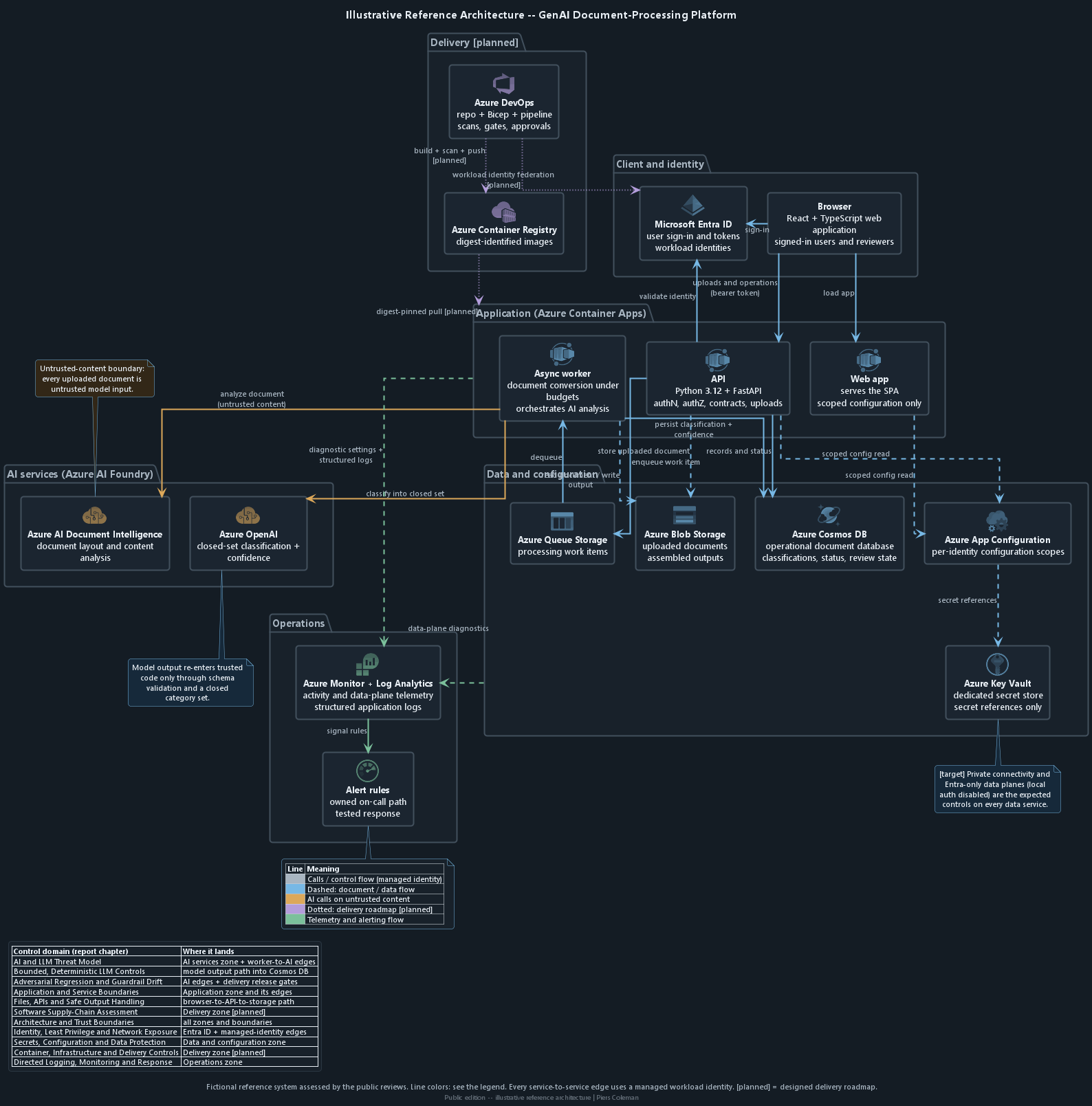
How Data and Access Move Through the System
1 critical1 high1 medium
Threat Tribunal · Demonstration Review
A demonstration of how the review maps a running Azure environment, gathers safe read-only evidence, checks access at every boundary, and verifies monitoring and controlled releases.
Informed by OWASP LLM Top 10 OWASP Top 10 / ASVS NIST AI RMF (GenAI Profile) MITRE ATLAS / CWE Microsoft Zero Trust
Cloud-security conclusions should be tied to the environment that is actually deployed, not inferred solely from diagrams or infrastructure templates.
This review method starts by reconstructing what is actually deployed in Azure and how data moves through it from start to finish. It then uses safe, read-only records to examine identities, network boundaries, settings, stored credentials, data services, containers, releases, logging and alerts.
The resulting architecture view shows which service path each security control protects.
Assessment Principle
Click or tap a zone or checkpoint on the diagram to jump to the related illustrative security examples.
| Azure service | What we check | What could go wrong |
|---|---|---|
| Application hosting and delivery | ||
| Azure Container Apps | Who can reach the application, which identity each service uses and which restrictions apply while containers run |
|
| Azure Container Registry | Who can upload or download container images, whether the built-in administrator account is enabled and whether releases use a fixed image version |
|
| Data, configuration and secrets | ||
| Azure Blob + Queue Storage | Who can connect, which networks can reach stored files and work items, and when they are deleted |
|
| Azure Cosmos DB | How people and applications sign in, which records each role can read or change and which database actions the application exposes |
|
| Azure App Configuration | Which settings each application can read and whether secrets are kept in Azure Key Vault instead of stored as ordinary values |
|
| Azure Key Vault | Who can read or list secrets, how deleted secrets are protected and whether applications retrieve them directly from the vault |
|
| Identity and operations | ||
| Microsoft Entra ID | How users sign in, which identities applications use and what each role is allowed to do |
|
| Azure Monitor + Log Analytics | Which security events are recorded, how long logs are kept and who receives each alert |
|
Each review area has its own page with worked, explicitly fictional severity examples.
Review Area 1
Review Area 2
Review Area 3
Review Area 4
Review Area 5
This review leads with deployed configuration and cloud identity: which services are reachable, which identities can use them and whether monitoring and release controls are active. The Application review proves the companion boundary in source code, customer-record authorization, AI handling and application tests.
See how the Application review verifies behaviour inside the deployed boundary.
This demonstration shows what a Threat Tribunal engagement delivers and how each chapter uses evidence.
This site contains no client names, identifiers, resource names, source paths, or any combination of details that could reconstruct a client environment.
Cross-reference links lead only to fictional examples created for this demonstration. They never lead to client code, Azure resources or engagement test output.
This report explains what the review covers, how it works and what it checks. It does not include client findings, ratings, evidence, fix status or current cloud settings.
It is not a penetration test, certification or assurance opinion. Inclusion of a topic means it was assessed, not that a finding existed.