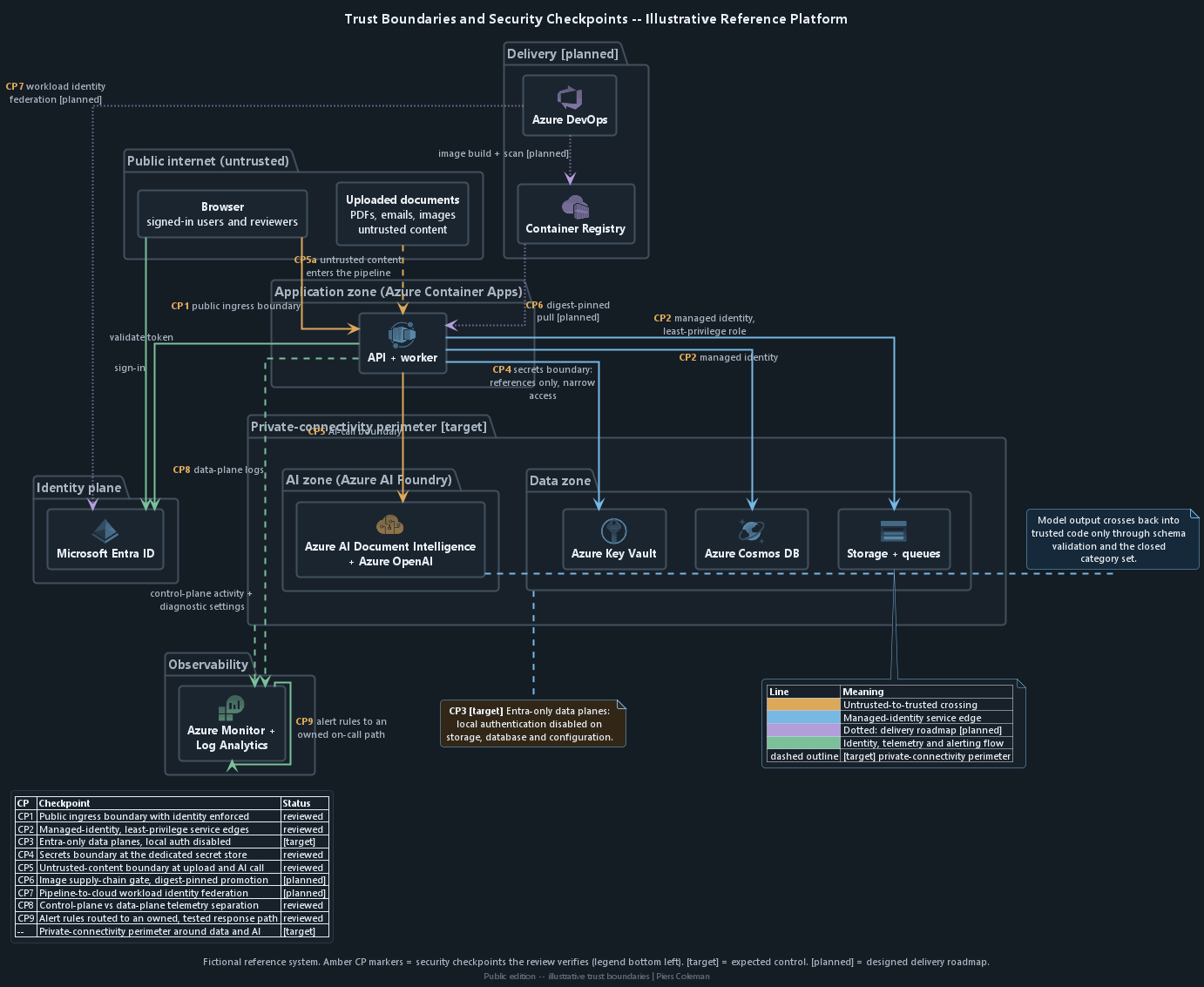
A useful cloud-security diagram must show more than service icons. It
should show which identity connects, where data moves, what each
component can do and where untrusted input enters a more trusted part
of the system.
Security checkpoints
Reviewed means the checkpoint is included in this demonstration review.
Target marks the expected architecture; planned marks the release roadmap.
Checkpoint
Security check
Review posture
CP1
The public entry point requires sign-in.
Reviewed
CP2
Application identities have only the access they need.
Reviewed
CP3
Microsoft Entra ID controls data access and local access keys are disabled.
Target
CP4
Passwords and keys stay in Azure Key Vault with limited access.
Reviewed
CP5
Uploaded documents remain untrusted at intake and at the AI call.
Reviewed
CP6
The release admits only an approved container image digest.
Planned
CP7
The release pipeline uses a short-lived Microsoft Entra ID identity.
Planned
CP8
Administration and data-access logs remain separate.
Reviewed
CP9
Alert rules route to an assigned, tested response path.
Reviewed
Boundary
A private network boundary surrounds the data and AI services.
Target
Click or tap a zone or checkpoint on the diagram to jump to the related illustrative security examples.
Security checkpoints the review verifies, overlaid on the illustrative platform. [target] marks expected controls; [planned] marks the designed release roadmap. See also the full reference architecture on the report overview.
Architecture question
Security purpose
Access and data boundaries
Which identity performs each service-to-service call?
Checks that each identity has only the access it needs and that enforced policy, not an application assumption, decides permission.
Where does client information cross a service boundary?
Identifies requirements for encryption, permission checks, audit records and limits on collected or retained data.
Application and deployment controls
Which component can transform or act on model output?
Locates the fixed code check around AI output that can vary.
Which controls exist only in deployment configuration?
Highlights differences that can develop between cloud setup files and the live environment.
Fictional Security Examples
Illustrative Architecture and Trust-Boundary Examples
Illustrative only - not an engagement finding
A Public API Can Accept Sensitive Requests Without Checking Access
A public Azure API must establish a trusted identity boundary before sensitive requests reach application code. It must validate the caller's Microsoft Entra ID token, admit only approved application roles and keep service identities separate.
Assessment profile
Ease of attack
A reachable API accepts the requestA caller reaches a Container Apps API without valid Microsoft Entra ID sign-in or an approved application role.
Impact
Protected services or privileged work are exposed
A caller could reach APIs and services intended only for trusted users or workloads.
A caller could trigger work intended for an approved user or service.
Detection difficulty
Exercise each entry pathTest signed-out, wrong-tenant, wrong-issuer, wrong-audience and wrong-role requests through the public API.
Pattern
Cloud admission before application authorizationAzure ingress and identity controls decide who may reach sensitive operations; application code separately decides which customer records and actions that caller may use.
Expected fixVerification
1
Expected fixRequire identity at public entryContainer Apps ingress and Microsoft Entra ID: Require authentication before the API accepts a sensitive request.
Expected fixValidate every token boundaryMicrosoft Entra ID token validation: Accept only the approved tenant, issuer and API audience.
VerificationReject tokens for another boundaryWrong-tenant, wrong-issuer and wrong-audience tokens are rejected before the API operation.
3
Expected fixRestrict sensitive operations to approved rolesMicrosoft Entra ID application roles and FastAPI route policy: Map each sensitive operation to the roles allowed to reach it.
VerificationDeny the wrong application roleA validly signed-in caller without the required application role receives 403, while the approved role still works.
4
Expected fixKeep transport and ingress restrictions explicitContainer Apps ingress and network configuration: Require HTTPS and expose only the intended public entry point.
VerificationBlock unintended entry pathsPlain HTTP, internal-only routes and unapproved ingress paths cannot reach the sensitive API.
5
Expected fixSeparate service identitiesContainer Apps workloads, Microsoft Entra ID, Blob Storage and Cosmos DB: Give each workload only the managed-identity roles it requires.
VerificationEnforce the role boundaryA service call without the required role fails, while approved service operations still complete.
A background worker can become a path to internal services or outside systems if it accepts a destination from an upstream response and attaches its own identity when it connects.
Assessment profile
Ease of attack
A returned address controls the next requestAn attacker influences a destination, redirect, port or DNS result that the worker follows.
Impact
The worker's authority reaches the wrong place
A destination could receive a privileged request or token.
The worker could reach an internal, cloud-metadata or otherwise unintended service.
Detection difficulty
Follow the destination through the workerTrace the original value, redirects, DNS resolution, token audience and egress decision before connection.
Pattern
The worker chooses approved destinationsA response may supply data, but server-owned rules decide where the worker may connect and when its identity is used.
Expected fixVerification
1
Expected fixAllow only approved destinationsBackground-worker destination validation: Keep scheme, host and port in a server-controlled allowlist.
VerificationReject an unapproved addressAn unknown host, scheme or port fails before any connection.
2
Expected fixBlock internal and metadata addressesWorker DNS and address validation: Resolve destinations before connecting and reject private, loopback, link-local and cloud-metadata addresses.
VerificationStop internal-address attemptsEach blocked address fails before a credential is attached.
3
Expected fixRecheck redirects and DNS changesWorker HTTP client: Disable redirects or validate every redirected destination and resolved address again.
VerificationReject a changed routeA redirect or changed DNS result cannot move the request to an unapproved address.
4
Expected fixBind identity tokens to expected audiencesContainer Apps managed identity and Microsoft Entra ID: Request a token only for a fixed, expected audience.
VerificationDeny an unexpected audienceA token request for any other audience fails.
5
Expected fixConstrain outbound workBackground-worker Container Apps environment: Restrict egress and enforce connection-time, response-size and retry limits.
VerificationBlock excess or unapproved egressNetwork controls stop a missed destination, while an approved destination completes within its limits.
Documentation helps approved teams use an API. The same public documentation can give an attacker a map of administrative, diagnostic and internal operations that no anonymous caller should discover.
Assessment profile
Ease of attack
Public discovery routes can reveal the mapDocumentation, schemas or discovery routes are reachable on the public Container Apps address.
Impact
Sensitive operations become easier to find
An attacker learns available operations and parameters.
Internal routes, hostnames or provider behaviour can reveal how to target the service.
Detection difficulty
Check the public surface directlyTest documentation, schema, discovery and error routes as signed-out and differently authorized callers.
Pattern
Production exposes only the intended APIDisabled development routes stay unreachable; required documentation follows the same sign-in and role rules as the API.
Expected fixVerification
1
Expected fixDisable unnecessary discovery routesContainer Apps API production configuration: Remove public documentation, schema and discovery routes that are not needed.
VerificationReturn no routeA signed-out request to a disabled route returns 404.
2
Expected fixProtect required documentationContainer Apps API and Microsoft Entra ID: Require the same sign-in and role checks as the underlying API.
VerificationReject an unauthorized readerSigned-out or wrong-role access returns 401 or 403.
3
Expected fixShow each role only its permitted operationsAPI documentation and schema generation: Expose only operations and schemas that the signed-in role may use.
VerificationLimit the visible contractAn approved role sees only its permitted operations and schemas.
4
Expected fixRemove implementation detail from responsesAPI error handling: Omit internal hostnames, stack traces, provider errors and implementation-only routes.
VerificationReturn a safe public errorPublic failures contain no internal hostname, stack trace or raw provider detail.
5
Expected fixGate the production surfaceAzure DevOps [planned] release gate: Fail the production gate when a disabled development route becomes reachable.
VerificationCatch a re-enabled routeThe release gate fails when a disabled route responds.