Review Area 1
How AI Can Be Manipulated
1 critical1 high1 medium
Threat Tribunal · Demonstration Review
Attackers can manipulate AI, reach another customer's records or personally identifiable information (PII), trigger system actions, misuse uploaded files or exploit unsafe third-party software. This demonstration shows how one security review traces those risks across the whole application.
Informed by OWASP LLM Top 10 OWASP Top 10 / ASVS NIST AI RMF (GenAI Profile) MITRE ATLAS / CWE Microsoft Zero Trust
One manipulated AI response can expose trusted data or trigger a system action. Reviewing the AI, web pages, connected systems, background work, cloud setup and third-party software separately can miss the attack paths where they connect.
This review checks how attackers could manipulate the AI, whether safeguards still work after changes, what the source code allows, and whether third-party software introduces risk.
It treats every user message, uploaded document, piece of information pulled from another system, and AI response as potentially unsafe.
Trusted application code must check that content and decide whether the next action is allowed.
Assessment Principle
Click or tap a zone or checkpoint on the diagram to jump to the related illustrative security examples.
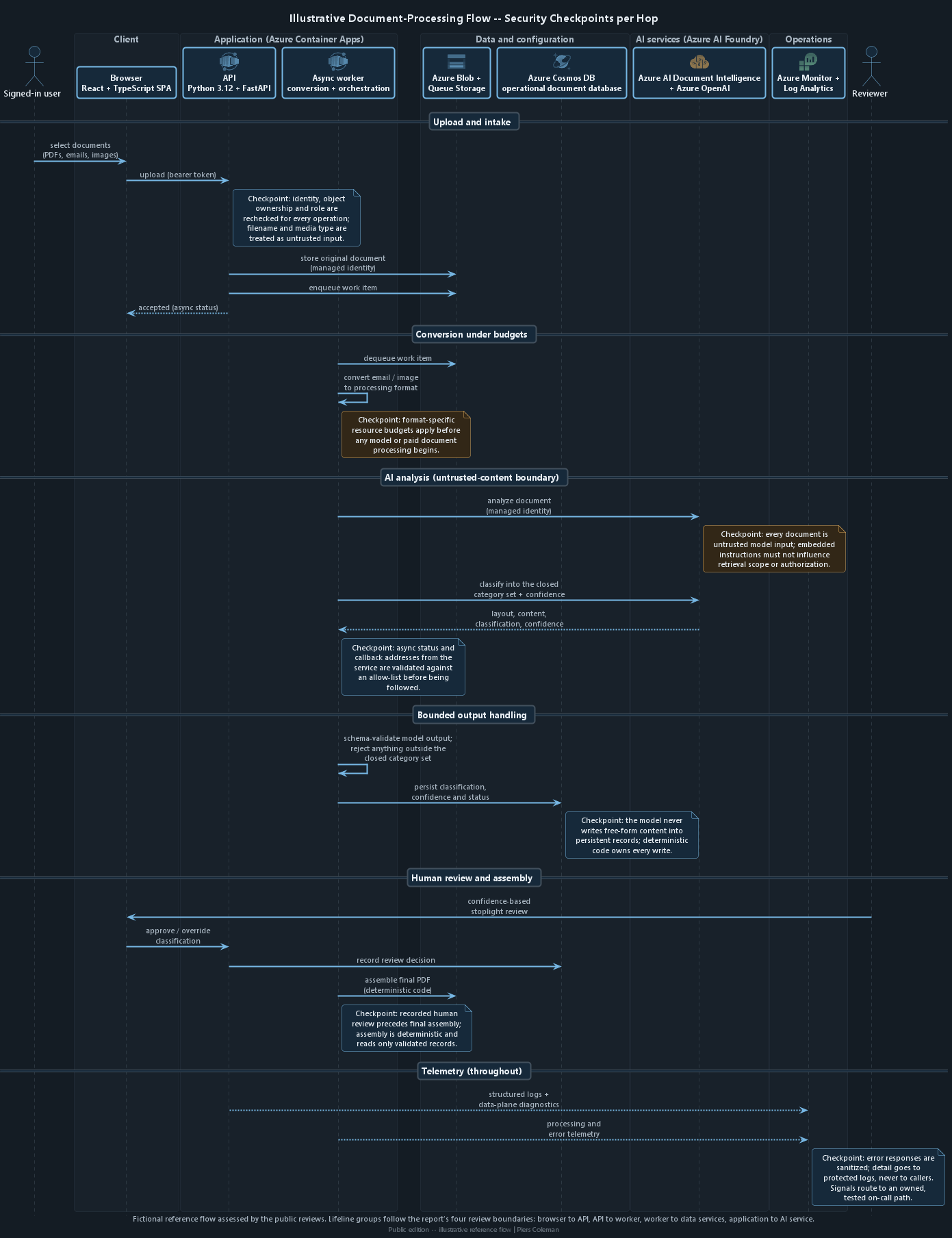
| Component | What we check | What could go wrong |
|---|---|---|
| Application code | ||
| React + TypeScript frontend | How users sign in, where access tokens (the digital proof of sign-in) are stored and whether server-only settings reach the browser |
|
| FastAPI API | Who can perform each system action, which fields a request may change and what errors reveal |
|
| Background Python worker | Whether queued work is genuine, what the worker identity can access and how jobs are isolated |
|
| Document and AI processing | ||
| File uploads and conversion | Whether the file is really an allowed type and how much processing one file may consume |
|
| Azure AI Document Intelligence + Azure OpenAI | Instructions sent to AI, checks on AI responses and which service addresses the application follows |
|
| Software supply chain and delivery | ||
| Dependencies (pip-audit, npm audit) | Third-party packages with known vulnerabilities, ranked by whether untrusted data can reach them |
|
| Containers (Trivy) | Packages inside each image, its base image and the account it runs under |
|
| Delivery (Azure DevOps) [planned] | How code is scanned, approved, released and rolled back |
|
Each review area has its own page with worked, explicitly fictional severity examples.
Review Area 1
Review Area 2
Review Area 3
Review Area 4
Review Area 5
This review leads with application behaviour and object authorization: what the code allows, which records a caller may use and how untrusted AI or file content is handled. The Azure review proves the companion boundary in deployed configuration, cloud identity, networking and monitoring.
See how the Azure review verifies the deployed cloud boundary.
This demonstration shows what a Threat Tribunal engagement delivers and how each chapter uses evidence.
This site contains no client names, identifiers, resource names, source paths, or any combination of details that could reconstruct a client environment.
Cross-reference links lead only to fictional examples created for this demonstration. They never lead to client code, Azure resources or engagement test output.
This report explains what the review covers, how it works and what it checks. It does not include client findings, ratings, evidence, fix status or current cloud settings.
It is not a penetration test, certification or assurance opinion. Inclusion of a topic means it was assessed, not that a finding existed.