This is the whole report on one page, intended for reading end to end or printing to PDF. The chaptered edition is the primary version.
Executive Summary
One manipulated AI response can expose trusted data or trigger a system
action. Reviewing the AI, web pages, connected systems, background
work, cloud setup and third-party software separately can miss the
attack paths where they connect.
This review checks how attackers could manipulate the AI, whether
safeguards still work after changes, what the source code allows, and
whether third-party software introduces risk.
It treats every user message, uploaded document, piece of information
pulled from another system, and AI response as potentially unsafe.
Trusted application code must check that content and decide whether the
next action is allowed.
Assessment Principle
AI provides semantic reasoning. It interprets meaning, classifies information and supports human judgment.
Deterministic code keeps control. The application, not the AI, controls identity, permissions, data formats, allowed actions and high-impact approvals.
Scope and Reviewed Technology
Application: This demonstration follows a web
application that uses AI to read and process documents. The browser
is built with
React
and TypeScript.
FastAPI
services and a background
Python
worker perform the work.
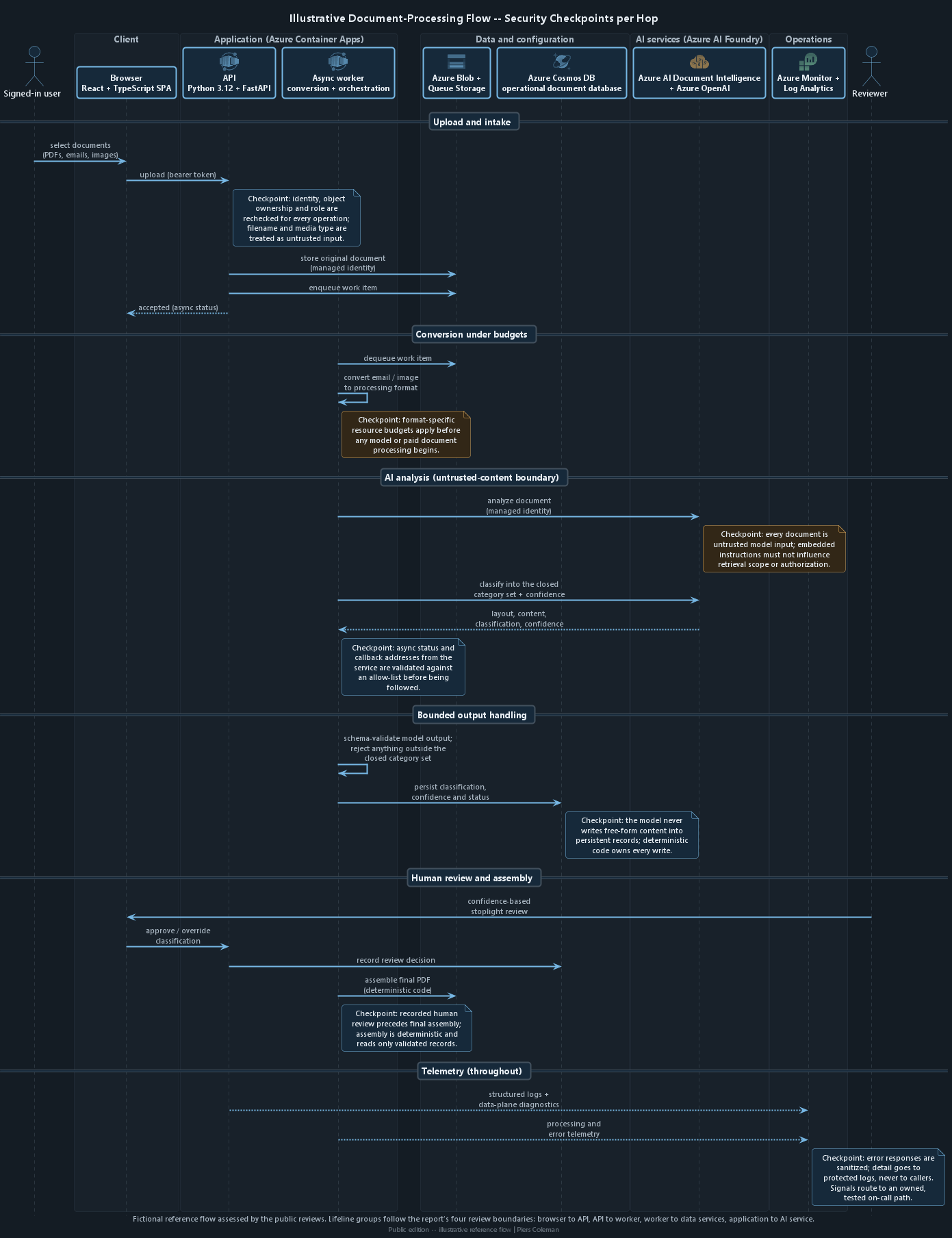
Click or tap a zone or checkpoint on the diagram to jump to the related illustrative security examples.
The illustrative document-processing flow with a security check at every step. Fictional and representative; the diagram columns follow the review's four parts of the system. See also the reference architecture in the Azure review.
How code is scanned, approved, released and rolled back
Secrets remain in source history
Image references can change
Releases lack approval checks
How AI Can Be Manipulated
Prompt injection means giving an AI model instructions designed to
manipulate its response. Those instructions can come directly from a
user or hide inside documents, email, images, retrieved records or other
content the application asks the model to process.
Resource and cost abuse Denial of walletOWASP LLM10
Resource and cost abuse, often called denial of wallet, can cause
serious harm without a data breach. One crafted or oversized upload
can trigger repeated model calls before anyone notices the rising bill.
The review checks file limits, retry and queue limits, model quotas,
and spend alerts with a named owner and response path.
Security boundary. Content filtering can reduce risk,
but it does not replace sign-in, permission checks, data-shape
validation or minimum necessary access. High-impact actions still
need deterministic code: fixed application rules that produce the
same decision from the same input.
Fictional Security Examples
Illustrative AI and LLM Threat Examples
Illustrative only - not an engagement finding
Uploaded Documents Can Make AI Access Another Customer's Data
Every uploaded document is AI input that the application must not trust. If hidden instructions can influence which records are retrieved or who may access them, prompt injection can become a way for one customer's data to reach another.
Assessment profile
Ease of attack
Requires crafted document contentText in a PDF, email or image can request another customer’s records. The application becomes vulnerable when it trusts the model-selected record or search scope without rechecking it.
Impact
Cross-customer disclosure
Customer records containing personally identifiable information (PII) could cross a customer boundary.
PII could appear in an AI response, log entry or generated working paper.
Detection difficulty
Deep trace requiredTrace model output through retrieval, authorization and subsequent data access.
Pattern
Prompt-injection boundaryUntrusted document content influences which records the application retrieves.
Expected fixVerification
1
Expected fixTreat document text as dataAzure AI Document Intelligence output and background-worker prompt construction: Keep extracted document text separate from application instructions.
VerificationIgnore hidden instructionsTest documents cannot reveal planted cross-customer data, while authorized classification still works.
2
Expected fixDerive scope server-sideFastAPI authentication context and worker job payloads: Derive scope only from the signed-in user and server-side data.
VerificationProtect server-derived scopeModel-proposed identifiers cannot override the signed-in user's scope.
3
Expected fixReauthorize every operationCosmos DB and Blob Storage data-access methods: Recheck access immediately before every read or write.
VerificationRecheck at the data boundaryAn out-of-scope request is denied immediately before the data operation.
4
Expected fixValidate model output strictlyAzure OpenAI response parsing and schema validation: Reject unknown identifiers, actions, fields or destinations.
VerificationReject unknown outputUnknown values are rejected before any database or storage operation.
5
Expected fixMediate all data accessAzure OpenAI integration and server-side data-access adapters: Give the model no database or storage credentials or direct route.
VerificationBlock direct model accessThe model has no credential or route to database or storage records.
6
Expected fixFail closed and log safelyFastAPI and background worker authorization failures: Deny scope changes and record them in server-side logs without document or customer content.
VerificationDeny and log scope changesEach attempt is denied and logged without document or customer content.
Tax documents are dense with personally identifiable information (PII). Copies can escape the approved workflow through model responses, prompts, traces, errors or support logs even when the primary data store is protected.
Assessment profile
Ease of attack
Output or log accessA caller or support user can trigger or inspect responses that contain more document content than the workflow requires.
Impact
PII disclosure
Names, identifiers and financial details could reach unauthorized users or support tools.
Monitoring data could retain PII longer than the source document.
Detection difficulty
End-to-end content traceTrace planted test details through document analysis, model input and output, API errors, status records and monitoring logs.
Pattern
Minimize, mask and restrictDocument content crosses more application and monitoring surfaces than the approved business process requires.
Expected fixVerification
1
Expected fixMinimize model inputBackground worker after Azure AI Document Intelligence: Send Azure OpenAI only the fields required for classification.
VerificationLimit model exposureCaptured requests show that Azure OpenAI receives only the approved minimum fields.
2
Expected fixMask details the model does not needWorker content-preparation step: Mask PII before the model call when classification does not require it.
VerificationPreserve useful classificationPlanted unnecessary details are masked while authorized classification still produces the expected result.
3
Expected fixRedact every outbound surfaceFastAPI responses, worker errors, Cosmos DB status records and PDF assembly: Redact or reject PII before content leaves the approved workflow.
VerificationStop secondary disclosurePlanted details do not appear in responses, errors, ordinary logs or unapproved status records, while approved output retains the minimum required information.
4
Expected fixProtect necessary diagnostic tracesAzure Monitor and Log Analytics: Keep diagnostics containing PII or document content in dedicated tables with explicit retention.
VerificationExpire protected tracesTest traces are removed when the approved retention period ends.
5
Expected fixRestrict diagnostic accessLog Analytics role assignments: Grant access to restricted diagnostic tables only to named support or security roles.
VerificationDeny broad log accessA user without an approved support or security role cannot read the restricted diagnostic tables.
Even when a model cannot take privileged action, hidden instructions can still bias classification, increase manual review and route documents through the wrong business process.
Assessment profile
Ease of attack
Crafted document inputHidden instructions in extracted text can ask the model to ignore the category rules or invent confidence.
Impact
Misclassification and workflow disruption
Documents could be omitted, misrouted or accepted with misleading confidence.
The final working paper could become less reliable.
Detection difficulty
Adversarial comparison requiredCompare crafted documents and model responses with a reviewed baseline and the recorded reviewer path.
Pattern
Bounded classificationUntrusted document content attempts to influence a closed-set category and confidence decision.
Expected fixVerification
1
Expected fixKeep categories closedAzure OpenAI classification deployment: Allow only the approved category list.
VerificationReject unknown categoriesDirect and document-borne injection cases stay inside the approved list, while normal cases still produce valid categories.
2
Expected fixValidate category and confidenceBackground-worker response parser: Enforce a strict schema and reject malformed values or additional fields.
VerificationReject malformed outputUnknown categories, malformed confidence values and extra fields are rejected without saving a classification.
3
Expected fixSeparate instructions from contentWorker boundary between Azure AI Document Intelligence and Azure OpenAI: Treat extracted text only as data inside the classification prompt.
VerificationIgnore document instructionsCrafted PDFs, emails and images cannot replace the classification rules or force a preferred confidence value.
4
Expected fixRoute uncertainty to peopleFastAPI review workflow and Cosmos DB status: Send uncertain, declined or below-threshold results to a recorded classification review.
VerificationRequire recorded reviewEvery uncertain, declined or below-threshold result enters the recorded classification review before it is accepted.
5
Expected fixPreserve original model evidenceCosmos DB review audit and PDF assembly: Store the original category, confidence and model evidence beside any reviewer correction.
VerificationKeep corrections auditableAn approved reviewer can correct the result without changing or replacing the original model evidence.
Content filtering can reduce harmful model responses, but it does
not replace authorization, output validation or approval in
application code.
Document and data access: keep customer scope in server-side code and treat uploaded content as untrusted. See document-borne prompt injection.
Classification and output handling: constrain categories and validate every response before storage or display. See bounded classification and output validation.
System actions and retesting: require application approval for actions and replay known attacks after relevant changes. See action controls and security regression evidence.
Retesting AI Safety After Changes
A model, prompt, analyzer or searchable-data change can alter security
behaviour even when ordinary application tests still pass.
Reusable attack-test pack
Direct prompt-injection attempts
Hidden instructions inside documents
Attempts to reveal personally identifiable information (PII)
Invalid AI responses and unauthorized-action requests
An AI response is untrusted text, not permission to act. The application must never turn it directly into an email, database change, file deletion, paid operation or other system action. Before anything happens, server-side rules must check the signed-in user, the affected customer, the requested action and any required human approval.
Assessment profile
Ease of attack
A manipulated response becomes a commandAn attacker changes the model's response, and the application uses it to choose a tool, destination or operation without an independent check.
Impact
Unauthorized system action
Model output could trigger disclosure, destructive changes or external communication.
It could start paid processing outside the intended workflow.
Detection difficulty
Follow the response to the final actionTrace the Azure OpenAI response through the worker, permission checks, approval step and resulting operation.
Pattern
The model recommends; the server decidesThe model may suggest an action, but fixed server-side rules must decide whether it is allowed.
Expected fixVerification
1
Expected fixKeep every operation behind application codeBackground worker and server-side service adapters: Give Azure OpenAI no credentials and no direct route to tools or connected services.
VerificationConfirm the model cannot act directlyThe model has no credential or connection that can invoke a tool or connected service.
2
Expected fixAllow only defined actionsWorker action-selection code: Match a checked model response to a fixed list of actions and permitted fields.
VerificationReject unsupported actionsUnknown actions, destinations and values fail before anything is sent, changed or charged.
3
Expected fixTake customer and destination details from the serverFastAPI sign-in context and worker jobs: Set the customer, destination and permitted values from trusted server data, not from the model response.
VerificationIgnore model-proposed scope changesA customer, destination or value proposed by the model cannot replace the trusted server value.
4
Expected fixCheck permission immediately before actingServer-side action and data-access code: Recheck the signed-in user and customer immediately before each operation.
VerificationDeny the action at the final boundaryAn otherwise valid action with the wrong customer or user permission is denied immediately before execution.
5
Expected fixRequire accountable approvalFastAPI review workflow and worker action state: Require a named person's recorded approval before any external, irreversible or high-impact operation.
VerificationStop before high-impact workEvery external, irreversible or high-impact test action waits for recorded human approval.
6
Expected fixRecord who requested and approved the actionAzure Monitor and application audit logs: Record the user, requested action, approval, enforcing code and outcome without personally identifiable information (PII), document content or model output.
VerificationKeep actions traceableThe audit trail identifies the user, request, approval, enforcing code and outcome without storing PII or document content.
An AI response can contain invented categories, unexpected fields, unsafe links or code-like text. If the application saves or displays it without checking, those values can corrupt a customer record, run in a browser or appear in the final working paper.
Assessment profile
Ease of attack
An unexpected AI response is acceptedThe model returns an invented category, identifier, field or piece of document content, and the application saves it without applying fixed validation rules.
Impact
Incorrect records or unsafe displayed content
Unexpected values could put a record into the wrong workflow state or cause active content to run.
Unchecked AI text could reach a customer's final working paper.
Detection difficulty
Follow the response to every destinationInspect how the response is checked, written to Cosmos DB, displayed in React and approved before PDF assembly.
Pattern
Check before saving or displayingAccept only expected Document Intelligence and Azure OpenAI values before they reach storage, the browser or a working paper.
Expected fixVerification
1
Expected fixDefine exactly what a valid response containsDocument Intelligence and Azure OpenAI response models: Accept only named categories, expected fields and required data types.
VerificationAccept a valid responseA response with an approved category, fields and data types is checked and saved correctly.
2
Expected fixStop when a response cannot be checkedBackground-worker response checks: Stop when the response cannot be read or fails validation, and do not save part of the workflow state.
VerificationSave nothing from an invalid responseAn invalid response fails before any classification or workflow value is saved.
3
Expected fixReject unexpected values before savingCosmos DB data-access code: Reject extra fields, unknown values and categories that are not approved before every write.
VerificationKeep unexpected output out of Cosmos DBExtra fields, unknown values and unapproved categories are rejected before a Cosmos DB operation occurs.
4
Expected fixDisplay AI text as text, not codeReact, application logs and PDF assembly: Encode model content for each destination so it cannot be interpreted as HTML, script or a control sequence.
VerificationKeep active content harmlessHTML, script syntax and control characters remain inert in browser, PDF and log output.
5
Expected fixRequire review before deliveryFastAPI review state, Cosmos DB and PDF assembly: Allow only recorded, human-approved model content into the final working paper.
VerificationPublish reviewed content onlyOnly human-approved classifications and content appear in the final test working paper.
Changing the AI model, the instructions it receives, how documents are analyzed or the information it can search may allow an attack that the previous release blocked. Before release, the team must rerun known attacks and normal user tasks. If an attack succeeds, a normal task fails or a required result is missing, the release must stop.
Assessment profile
Ease of attack
A change can weaken protection silentlyA new model, instruction, analyzer or response-handling change can behave differently while ordinary application tests continue to pass.
Impact
Previously blocked attacks can work again
Prompt injection or PII disclosure that was blocked before could return.
AI output checks or action limits could weaken without an obvious application error.
Detection difficulty
Ordinary tests may still passThe problem appears only when the same attack and normal-use tests are run against the changed AI setup and compared with the approved result.
Pattern
Retest attacks before every releaseEvery AI-related change must run the approved attack tests and normal business cases before deployment.
Expected fixVerification
1
Expected fixStore the exact test setupSecurity-test evidence store: Keep the attack cases, test documents, approved results, Document Intelligence analyzer, Azure OpenAI deployment, instructions and response format together under version control.
VerificationShow exactly what was testedThe release record names every model, analyzer, instruction set, response format, test document and approved result used by the run.
2
Expected fixRerun tests after every relevant changeAzure DevOps security-regression job: Run the versioned set when AI services, prompts, response handling or control code change.
VerificationTest attacks and normal work togetherEvery relevant change runs the complete set. Known attacks stay blocked and normal business cases still work.
3
Expected fixRequire approval when a result changesAzure DevOps protected review: Require a named reviewer to explain and approve every changed expected result.
VerificationReject unapproved result changesA changed expected result cannot pass the release gate without the named review and approval.
4
Expected fixStop release when protection gets weakerAzure DevOps release gate: Stop release when a required result is missing or a previously blocked attack now succeeds.
VerificationBlock missing or failed security resultsA missing result or newly successful attack case blocks release.
5
Expected fixKeep the results with the releaseAzure DevOps release artifacts: Store the result comparison, reviewer identity and approval with the release record.
VerificationMake the release decision reviewableThe release record keeps the exact test comparison and named approval that allowed deployment.
Hiding or disabling a button only changes what the user sees. A user
can still call the API directly with browser tools or another program.
The API and the services it calls must therefore check the signed-in
person's permission before every read, change or system action.
Boundary
Review question
Browser to API
Are sign-in, permissions and record ownership checked again for every operation?
API to worker
Can background work be authenticated, limited, repeated safely and traced to the person or service that started it?
Worker to data services
Does each service use only the identity and data access it needs?
Application to AI service
Does fixed application code limit the model's input, output and any later action?
Fictional Security Examples
Illustrative Application Boundary Examples
Illustrative only - not an engagement finding
Signed-In Users Can Access Another Customer's Records
Sign-in proves who a caller is, but it does not prove that the caller may read or change every customer record exposed by an API.
Assessment profile
Ease of attack
Low effort for a valid userThe caller changes a customer or record identifier and relies on the API not checking the resolved object.
Impact
Cross-customer record access
A valid user could read another customer's documents and personally identifiable information (PII).
The user could change or delete those records.
Detection difficulty
Per-object testing requiredTrace each FastAPI permission check through service functions, Cosmos DB and Blob Storage.
Pattern
Object-level authorizationAuthentication succeeds, but authorization is missing for the individual record being requested.
Expected fixVerification
1
Expected fixDerive record scope server-sideFastAPI authentication context: Determine customer and record scope from the signed-in user and trusted server data.
VerificationIgnore client-supplied scopeChanging a customer or record identifier cannot change the scope derived for the signed-in user.
2
Expected fixScope every data queryCosmos DB and Blob Storage adapters: Include the authenticated customer in every record and document lookup.
VerificationPrevent unscoped accessDatabase and storage traces show that unauthorized identifiers never reach an unscoped query.
3
Expected fixAuthorize the resolved objectFastAPI service and data-access boundary: Recheck the final resource before every read, update, retry and deletion.
VerificationDeny cross-customer operationsA user assigned to one test customer receives 403 for every operation on another customer's record.
4
Expected fixHide unauthorized record existenceFastAPI authorization error handling: Return the same public response whether an unauthorized record exists or not.
VerificationPrevent record discoveryThe response does not reveal whether the unauthorized target record exists.
5
Expected fixCentralize the policyShared server-side authorization component: Use one owned policy from every FastAPI route and background operation.
VerificationCover every operation consistentlyAll read, update, retry and deletion paths use the same policy, while authorized operations on the user's own records still work.
Some operations can change system behaviour, repeat processing or remove records. Signing in should not automatically grant every user permission to perform those higher-impact actions.
Assessment profile
Ease of attack
Low effort after sign-inA caller invokes a sensitive FastAPI route that checks identity but not the role required for that operation.
Impact
Unauthorized system changes
An ordinary user could change processing behaviour or repeat paid work.
The user could alter or delete records outside their responsibility.
Detection difficulty
Route-by-route reviewMap each FastAPI route through dependencies, service functions and the data layer to its approved Entra ID role.
Pattern
Function-level role enforcementThe React interface may hide an action, but server-side authorization must control whether it runs.
Expected fixVerification
1
Expected fixMap operations to approved rolesShared server-side authorization policy: Define the Entra ID roles permitted for each sensitive operation.
VerificationDeny every unapproved roleFor every role, each unapproved operation returns 403 without changing data or starting paid work.
2
Expected fixEnforce roles in the APIFastAPI route dependencies: Deny sensitive functions by default, regardless of what the React interface displays.
VerificationPrevent interface-only protectionCalling the API directly cannot bypass an action hidden or disabled in React.
3
Expected fixRecheck high-impact operationsFastAPI service and data layer: Validate the current role immediately before destructive, irreversible or paid work.
VerificationFail at the final boundaryA destructive operation fails when its final permission check is missing, stale or no longer permits the actor.
4
Expected fixReject invalid role claimsFastAPI Entra ID token validation: Reject missing, unknown or conflicting role claims.
VerificationTest every invalid claim stateMissing, unknown and conflicting role claims each return 403 before the sensitive function runs.
5
Expected fixRecord the enforced identityApplication audit logging: Record the actual actor, role, operation and outcome.
VerificationKeep approved work accountableAn approved operation completes and records the actual actor, role and outcome.
When a user edits a record, the browser sends the changed fields to the API. The user can alter that request with browser developer tools or a separate API client and add fields the screen never showed. If the server saves those extra fields without checking them, the user could change who owns the record, which customer it belongs to, its approval status or its audit history.
Assessment profile
Ease of attack
Only a normal update request is neededThe user adds protected fields to the request sent to the API. The server accepts them because it does not limit which fields may be changed.
Impact
Records can change owner or bypass approval
A user could move a record to another customer, approve their own work or replace who performed the change.
Later processing may trust those false ownership, status or audit values.
Detection difficulty
The screen may still look correctThe hidden change appears only when the review compares the fields accepted by FastAPI with the values written to Cosmos DB.
Pattern
Accept only fields the user may changeEach update action should have a short, explicit list of permitted fields. The server must set customer, ownership, status and audit values itself.
Expected fixVerification
1
Expected fixDefine allowed fields for each updateFastAPI request models: Create a separate input model containing only the fields that action is allowed to change.
VerificationConfirm permitted changes still workEach permitted field can be changed through the correct endpoint, and Cosmos DB stores the new value.
2
Expected fixReject extra fieldsFastAPI request validation: Reject the entire request when it includes a field that is not listed in the input model.
VerificationBlock protected inputRequests that add ownership, customer, user, audit or protected workflow fields fail and change nothing.
3
Expected fixSet protected values on the serverFastAPI service code: Get customer, user, ownership, audit and workflow values from the signed-in user and trusted server state, not from the submitted request.
VerificationKeep ownership and audit values trustedSaved ownership, user and audit values come from trusted server state, never from fields supplied by the caller.
4
Expected fixCheck access before updatingData-access and authorization code: Load the existing record, confirm the signed-in user may change it, then apply the permitted changes.
VerificationDeny another customer's updatesA request to update another customer's record is denied before any Cosmos DB write.
5
Expected fixSave all or nothingFastAPI update service and Cosmos DB write: Validate every field and workflow change before saving. If one check fails, save nothing.
VerificationPrevent partial changesA rejected request leaves the entire record unchanged.
People outside the system can control filenames, file contents and
metadata. Each processing step must check them because a file that
passes one check can still be dangerous at the next.
Verify actual file content instead of trusting the supplied extension or reported file type.
Limit file size, expanded size, page count, processing time and cost before expensive work begins.
Build storage paths in a fixed, safe form and never use a filename to decide which customer may access a file.
Check AI output before displaying it, searching with it, writing it to a file or calling a privileged API.
Return useful errors without exposing implementation details, credentials, personally identifiable information (PII) or document content.
Fictional Security Examples
Illustrative File and Output Handling Examples
Illustrative only - not an engagement finding
Unsafe Uploaded Files Can Run in a Staff Member's Browser
When a staff member previews an uploaded file, the browser may treat code inside that file as part of the staff application. That code could read information shown to the reviewer, call the API through the reviewer's signed-in session or steal a browser access token. An uploaded document must never receive the same browser access as the application.
Assessment profile
Ease of attack
A normal-looking file hides executable contentAn attacker gives active content an allowed filename or reported file type, then relies on the preview to open it in the staff application.
Impact
The file acts through the reviewer's session
Code in the file could read page data or call APIs as the signed-in reviewer.
It could steal a Microsoft Entra ID access token if page scripts can read it.
Detection difficulty
Open a deliberately hostile test fileCheck what the server detects, how Blob Storage delivers the file, where React opens it and whether its code can reach the page, API or sign-in token.
Pattern
Treat the preview as an untrusted siteOpen uploaded files separately so code inside them cannot inherit the staff application's web address, permissions or signed-in session.
Expected fixVerification
1
Expected fixCheck what the file really containsFastAPI upload checks and background worker: Inspect the file's bytes and structure instead of trusting its name or the type reported by the uploader.
VerificationReject files disguised by name or typeA file containing active content is rejected or forced to download even when it uses an allowed filename or reported type.
2
Expected fixPreview only formats that cannot run codeFastAPI preview rules: Display only specifically approved non-executable formats. Force every unknown or active format to download instead.
VerificationKeep safe previews workingApproved documents display correctly, while unknown or executable formats cannot run in the browser.
3
Expected fixOpen previews in an isolated browser areaReact preview and Blob Storage delivery: Use a separate web address or a restricted frame that cannot run scripts as part of the staff application.
VerificationKeep the file separate from the applicationCode in the preview cannot read the staff page, call its authenticated APIs or communicate through unrestricted scripts.
4
Expected fixTell the browser exactly how to handle the fileFastAPI or Blob Storage response: Send the approved file type, display-or-download instruction, nosniff setting and content security policy.
VerificationConfirm every browser restrictionThe file response contains the required type, display-or-download instruction, nosniff setting and content security policy.
5
Expected fixKeep sign-in tokens away from page scriptsReact and Microsoft authentication-library session handling: Store Entra ID tokens where code inside a preview or injected into the page cannot read them.
VerificationConfirm the preview cannot steal a tokenHostile test content cannot read token storage or obtain the staff member's access token.
A file can look small when uploaded but require enormous work after it is opened. A compressed file may expand many times, a spreadsheet may contain millions of cells, or a PDF may contain thousands of pages. If the application does not stop that work early, one upload can fill worker memory, block the processing queue and trigger paid AI calls, delaying other users and increasing the cloud bill.
Assessment profile
Ease of attack
One deliberately expensive fileAn attacker uploads a compressed, page-heavy, image-heavy or very large spreadsheet file that requires far more work than its upload size suggests.
Impact
Other work stops and cloud costs rise
The file could consume the worker's memory, processing time or temporary storage.
Other customers' jobs could wait while repeated conversions and AI calls continue to incur charges.
Detection difficulty
Measure the work before paid services beginTest each supported file type and confirm that size, page, row, pixel, time and memory limits take effect before Document Intelligence or Azure OpenAI is called.
Pattern
Give every upload a hard processing allowanceEach file and processing step must have a maximum size, running time, memory use, temporary storage use, retry count and paid-service cost.
Expected fixVerification
1
Expected fixSet limits for each file type before conversionFastAPI upload checks and converter entry points: Permit only supported formats and enforce upload size, expanded size, page, row and pixel limits before conversion begins.
VerificationReject files that exceed any limitCompressed bombs, oversized spreadsheets, page-heavy files, extreme-resolution images and files with missing size information all stop before expensive work begins.
2
Expected fixLimit each job's time, memory and temporary storageIsolated background worker: Stop each conversion when it reaches its maximum running time, memory use or temporary disk space.
VerificationStop work at the configured limitSlow, memory-heavy and storage-heavy conversions stop at the approved worker limits.
3
Expected fixLimit how many jobs and retries one customer can createQueue Storage scheduling and worker retries: Cap simultaneous conversions, retry attempts and total queued work for each customer and job.
VerificationStop excess jobs and retriesSimultaneous jobs, repeated retries and total queued work stop at the configured customer and job limits.
4
Expected fixDo not call paid AI services after a limit is exceededWorker check before Azure AI Document Intelligence and Azure OpenAI: Stop an over-limit job before it sends any paid analysis request.
VerificationConfirm rejected work creates no AI chargeAn over-limit job sends no request to Document Intelligence or Azure OpenAI.
5
Expected fixRemove partial work without delaying other jobsBlob Storage, Cosmos DB and worker failure handling: Remove partial files and status records from a stopped job without blocking the API or unrelated work.
VerificationConfirm normal documents still completeA stopped job removes its partial files and records without delaying other jobs, while a normal document still completes.
Error detail is valuable to engineers but can disclose filenames, record identifiers, model responses and internal structure to callers or broad log audiences.
Assessment profile
Ease of attack
Safe failure pathsA caller triggers malformed input or a provider error and inspects what the application returns or records.
Impact
PII and internal-detail disclosure
A caller or log reader could learn internal service details.
Errors could reveal PII, document, customer or model content.
Detection difficulty
Failure-path trace requiredExercise upload, conversion, Blob Storage, Document Intelligence and Azure OpenAI failures through responses, logs and Cosmos DB status.
Pattern
Error sanitizationPublic errors stay stable and minimal while protected diagnostics remain available to approved engineers.
Expected fixVerification
1
Expected fixUse one public error contractFastAPI exception middleware: Return stable public error codes and a correlation identifier.
VerificationReturn predictable failuresMalformed requests and simulated provider failures return the approved code and correlation identifier.
2
Expected fixHide provider and stack detailsFastAPI adapters for Blob Storage, Azure AI Document Intelligence and Azure OpenAI: Never return raw provider errors, stack traces or internal hostnames to React.
VerificationKeep internal details privateBrowser responses contain no stack trace, internal hostname or raw provider error.
3
Expected fixFail without changing trusted stateFastAPI authorization and Cosmos DB or Blob Storage failure handling: Prevent partial updates and hide whether an unauthorized resource exists.
VerificationFail safely and preserve valid workAn unauthorized request reveals no record existence, a failed operation makes no partial update, and a valid operation still completes.
The review combines manual analysis of source code and cloud setup
files with several security tools. Reviewers check each reported issue
against the application's real code paths instead of treating the
tool's raw count as the result.
Tool or standard
Purpose
Gitleaks
Detect likely secrets in the current tree and available history.
pip-audit and npm audit
Compare the exact installed Python and JavaScript packages with public security advisories.
Trivy
Check the software used to build a container image and the vulnerabilities inside that image.
CWE, OWASP and ASVS
Classify weakness patterns and connect them to verifiable security requirements.
A service key committed to deployment source or copied into build output remains recoverable from history and artifacts even after the latest file is cleaned up.
Assessment profile
Ease of attack
Repository or artifact accessA reusable cloud credential remains in source history, build output, caches or deployment files.
Impact
Unauthorized service use
Anyone with a retained copy could use the service outside the application.
Access continues until the credential is revoked.
Detection difficulty
History and artifact scanSearch the current tree, repository history, build artifacts, caches and deployment output without attempting to use the secret.
Pattern
Remove reusable credentialsWorkloads use scoped Entra ID identities instead of service keys stored with source or builds.
Expected fixVerification
1
Expected fixRevoke and investigate exposureCredential owner and Azure Monitor logs: Revoke and rotate the value, then review its known exposure window for unauthorized use.
VerificationReject the old valueThe revoked credential no longer authenticates, and the log review covers its full exposure window.
2
Expected fixPurge every retained copyAzure DevOps repository, artifacts, caches and deployment output: Remove the credential from current and historical material.
VerificationFind no surviving copySecret scans of current files, history, artifacts, caches and deployment output return no match.
3
Expected fixUse a least-privilege workload identityContainer Apps managed identity and Entra ID role assignments: Grant only the service roles the workload requires.
VerificationEnforce the approved role boundaryThe workload operates through managed identity and cannot perform operations outside its approved roles.
4
Expected fixRemove stored-key fallbackApplication code and App Configuration: Remove settings and fallback paths that still accept the reusable key.
VerificationRun without a stored credentialThe workload completes its approved work with no stored-key configuration or fallback path.
5
Expected fixGate merges and releases on scanningAzure DevOps validation and release pipelines [planned]: Block current files, history or generated artifacts that contain credentials.
VerificationBlock a planted secretA controlled test credential stops both merge and release.
The application relies on third-party libraries to open and read uploaded documents. If one of those libraries has a known security flaw, an attacker may trigger it simply by uploading a file designed for that parser. The flaw could run before the application has a chance to reject the document.
Assessment profile
Ease of attack
The attacker supplies a file the library opensA customer-controlled upload reaches an installed Python or JavaScript library whose known flaw applies to that file type and processing path.
Impact
The service can crash or run attacker-controlled code
A malicious document could exhaust memory or processing time, crash the worker or exploit unsafe file handling.
A severe flaw could run attacker-controlled code inside a service that processes documents containing personally identifiable information (PII) or other protected customer data.
Detection difficulty
Check whether uploaded files reach the vulnerable functionConfirm the installed library version, the file types and conditions needed to trigger the flaw, and whether the Container Apps worker sends customer uploads through that code.
Pattern
Prioritize flaws that users can actually reachA release should consider both how serious the published flaw is and whether an uploaded file can trigger the affected code.
Expected fixVerification
1
Expected fixUpgrade or remove the vulnerable libraryPython or JavaScript package files: Install a corrected version or remove the library, then lock the approved version used by clean builds.
VerificationConfirm a clean build installs the fixA build started from an empty environment installs the corrected library version and not the vulnerable one.
2
Expected fixBlock uploaded files from the vulnerable code until it is fixedContainer Apps upload and document-processing worker: Disable the affected feature or reject the relevant file type so customer uploads cannot reach the vulnerable library.
VerificationConfirm a test upload cannot reach the flawA controlled test file is rejected before the vulnerable library runs, while unaffected file types continue to work.
3
Expected fixMake every clean build install the same package versionsPython uv and npm build files: Use one approved lockfile for each runtime and verify downloaded packages against their recorded integrity values.
VerificationMatch the reviewed package listA clean build installs only the versions recorded in the approved lockfiles and rejects a package whose integrity check fails.
4
Expected fixRecord and scan every library shipped in the releaseAzure DevOps build and release evidence [planned]: Generate a list of every shipped package and version, then compare it with current security advisories.
VerificationConfirm the shipped versionThe final release package list contains the corrected version, excludes the vulnerable version and passes the advisory scan.
5
Expected fixBlock release while an exploitable library flaw remainsAzure DevOps release rules [planned]: Stop release when customer input can reach a known flaw, unless a named owner approves a time-limited exception.
VerificationRequire an owner and expiry for every exceptionThe release stops without approval. Any exception names its owner, explains why exposure is accepted and expires automatically.
A container scan may report known vulnerabilities, but it does not prevent deployment. If the release pipeline only saves the report and continues, the same vulnerable container image can still reach production. The pipeline must stop that image or require a named owner to accept the risk for a limited time.
Assessment profile
Ease of attack
The exploit depends on the reported flawThe important control failure is that Azure DevOps allows an image with a known vulnerability or missing proof of origin to continue toward production.
Impact
Known risk reaches production
A container with a known exploitable flaw could be deployed unchanged.
The team may be unable to prove that the deployed image is the one built from reviewed source and scanned.
Detection difficulty
Follow one image from build to deploymentConfirm which image entered Azure Container Registry, which scan result belongs to it, who accepted any exception and which identity deployed it.
Pattern
Approve and deploy the same container imageThe source, build record, package list, scan and deployment must all name the same fixed image fingerprint, called a digest.
Expected fixVerification
1
Expected fixDeploy the exact image that was approvedAzure Container Registry and Container Apps deployment [planned]: Release an image by its fixed digest rather than by a reusable name or tag.
VerificationMove the approved image without rebuilding itThe approved digest is deployed to the target environment without creating or substituting another image.
2
Expected fixAttach source and scan results to that imageAzure DevOps build record [planned]: Link the reviewed source revision, list of shipped packages and vulnerability scan to the image digest.
VerificationConfirm every record names the same imageThe source revision, build, package list, scan result and deployment all identify the same digest.
3
Expected fixStop images that violate the approved risk rulesAzure DevOps release gate [planned]: Block an image when a vulnerability is serious enough and the running application can reach the affected code.
VerificationConfirm a known violation stops deploymentA test image that violates the release rules cannot be deployed.
4
Expected fixRequire an owner and expiry for every exceptionAzure DevOps release approval [planned]: Require a named owner, a written reason for accepting the risk and an automatic expiry date.
VerificationKeep every accepted risk visibleAn exception names its owner and reason, remains attached to the release record and expires automatically.
5
Expected fixAllow only the release pipeline to deploy imagesAzure DevOps pipeline managed identity [planned]: Give deployment permission only to the controlled pipeline and only for an approved digest.
VerificationBlock manual or unauthorized deploymentA person or service identity outside the controlled pipeline cannot deploy an image.
This review leads with application behaviour and object
authorization: what the code allows, which records a caller may use
and how untrusted AI or file content is handled. The Azure review
proves the companion boundary in deployed configuration, cloud
identity, networking and monitoring.
This demonstration shows what a Threat Tribunal engagement delivers and how each chapter uses evidence.
This site contains no client names, identifiers, resource names, source paths, or any combination of details that could reconstruct a client environment.
Cross-reference links lead only to fictional examples created for this demonstration. They never lead to client code, Azure resources or engagement test output.
Limitations
This report explains what the review covers, how it works and what it checks. It does not include client findings, ratings, evidence, fix status or current cloud settings.
It is not a penetration test, certification or assurance opinion. Inclusion of a topic means it was assessed, not that a finding existed.